PRD alignment
Coding agents drift. A task gets reinterpreted, a decision quietly contradicts a requirement, an agent starts building something the PRD ruled out. The PRD Alignment Detector checks what your agent records in the feature's workbook against the feature's PRD, flags what doesn't line up, and, if you want, tells the running agent to reconcile before it goes further.
It judges what the agent declared (its tasks, decisions, and assumptions), not the code. Whether the code does what the PRD says is the verifier's job. The two together cover intent and behaviour.
Where it lives
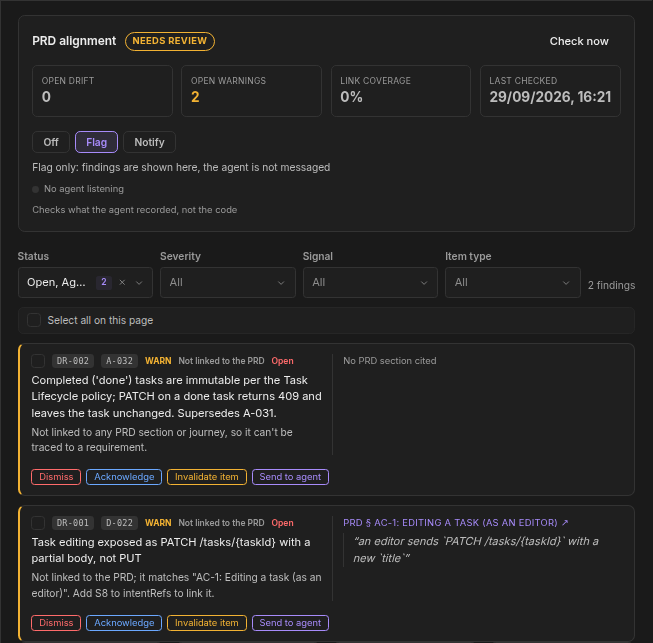
Open a feature, go to its Agent Context step, and stay on Overview. The PRD alignment card sits at the top: a status badge, four counters (Open drift, Open warnings, Link coverage, the share of items linked to the PRD, and Last checked), the mode control, and the findings panel below it. Check now runs a check straight away. A dot shows whether a coding agent is currently listening on the feature. If you don't see the card, the detector isn't enabled for your organization.
| Status | Meaning |
|---|---|
| Aligned | No open findings |
| Needs review | Open warnings, or most items are not linked to the PRD |
| Drifting | At least one open contradiction with the PRD |
| Unknown | Not checked yet, the PRD is not approved, or the PRD is not linked |
| Off | Alignment checks are off for this feature |
Modes
Each feature has its own mode, set on the card by anyone who can manage the project. New features start in Flag.
| Mode | What happens |
|---|---|
| Off | No checks, no findings, no cost |
| Flag | Findings show on the card for a human to review. The agent is not messaged |
| Notify | High-confidence contradictions are also sent to the running agent, which must reconcile before continuing |
Switching to Notify asks you to confirm: the agent will be interrupted automatically when a finding contradicts the PRD. Nothing is ever invalidated without you.
Checks use AI and count against your token allowance. Off costs nothing.
When a check runs
A check runs about two minutes after the workbook changes (a task, decision, or assumption is added or edited) or the PRD is saved. A burst of edits collapses into one check. Every new or changed item is judged once against the whole PRD; unchanged items aren't re-judged.
Findings
Each finding has a short id (DR-12), the workbook item it's about, a signal, a severity, and, when it points at the PRD, the section heading, a verbatim quote, and a link that opens the PRD at that passage.
| Signal | What it means |
|---|---|
| Contradicts the PRD | The item says or does something the PRD rules out |
| Outside the PRD's scope | The item goes beyond what the PRD asks for |
| Repeats a rejected item | The item brings back something that was already rejected |
| Not linked to the PRD | The item doesn't say which part of the PRD it serves |
| Links a missing PRD section | The item cites a section that no longer exists |
| Links a changed PRD section | The item cites a section whose text changed since |
Severity is Drift (a real conflict), Warn (worth a look), or Info. The panel shows ten findings a page, most severe first, and opens on the ones that need attention. Filter it by status, severity, signal, and item type.
Acting on a finding
| Action | Use it when | Result |
|---|---|---|
| Acknowledge | The finding is right and you've noted it | Closed as Acknowledged |
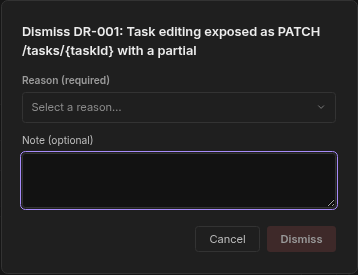
| Dismiss | The finding doesn't apply. Pick a reason: False positive, PRD is outdated, or Intentional deviation | Closed as Dismissed |
| Invalidate item | The item itself is wrong and shouldn't stand | The task, decision, or assumption is marked invalid, and the finding resolves |
| Send to agent | You want the running agent to reconcile this one now, even in Flag mode | The agent receives it (see below). An item can be sent once a day |
Select several findings to act on them at once from the bulk bar; the toast reports how many were applied and how many were skipped. These actions are for people only. An agent can't acknowledge, dismiss, invalidate, send, or change the mode.
When the feature ships, decisions under an open or acknowledged Drift finding are kept out of the Knowledge Base, so unresolved drift never becomes reference material.
A finding closes on its own as Resolved when a later check no longer sees the problem, for example because the agent fixed the item, or when the item is invalidated.
Each finding explains itself. A finding about an unlinked item often names the PRD passage the item most likely serves, and tells the agent which reference to add, for example Add S8 to intentRefs to link it.
What your coding agent does
The Dezycro platform skills handle the agent side:
- Linking items to the PRD. When
/<prefix>:dz-workbinds a session, the agent tags every task, decision, and assumption it records with the part of the PRD it serves:S3for PRD section 3,J1for a workbook journey, orINFRAfor enabling work the PRD doesn't mention (tests, tooling, refactors). Linked items are what let the detector be precise. Unlinked items show up as Not linked to the PRD. - Seeing open findings at the start of a session.
dz-worklists the feature's open Drift and Warn findings before it reports the session ready. Info findings are left out. - Reconciling when a finding is sent. A sent finding reaches the agent as a short pointer (never a copy of your PRD). The agent pulls the detail, then does exactly one of three things: fixes the item to match the PRD, records a decision that cites the finding and explains why that PRD line doesn't apply (the finding moves to Agent justified, and a person closes it), or stops and asks you. It never deletes or invalidates an item to make a finding go away.
In Notify mode, a Drift finding is sent automatically, with limits so the agent isn't flooded: an item is sent at most once a day, a feature gets at most three automatic sends a day, and nothing is sent automatically in the 30 minutes after the PRD changes.
Agents read findings with the list_prd_drift_findings MCP tool in the workbook toolset.
Getting good results
- Approve the PRD. The detector needs an approved PRD to check against; before that the card reads Unknown.
- Keep a clear scope in the PRD. A PRD that says what the feature must not do gives the detector something decisive to cite.
- Close findings deliberately. Dismiss with PRD is outdated is a signal to update the PRD, which re-checks the items against it.