Personas & Auth
Dezycro's generated tests run as real users — admin1, user1, readonly1, etc. Each of those identities is a persona with its own role, permissions, and credentials. The verifier picks the right persona for each test journey and authenticates as them when calling your API.
This guide covers the full path from defining personas in Dezycro through wiring credentials locally to passing them to CI.
Configure personas before generating tests
Dezycro's test generator decides which persona drives each journey at generation time. If your project has no personas (or only default), every generated journey runs as an unauthenticated anonymous client — which won't reach any endpoint behind auth and won't exercise role-aware behavior. Set your personas up first, then trigger test generation.
Running example: widgets-api
We'll thread a concrete example through this guide so every snippet has somewhere real to land.
- Service:
widgets-api, a small backend exposingGET /widgets,POST /widgets, andDELETE /widgets/{id}. - API base URL:
https://api.acme.example. - Auth: OIDC password-grant token endpoint at
https://auth.acme.example/oauth/v2/token. Responses look like{"access_token": "...", "expires_in": 3600}. - Three personas we'll set up:
admin1— can create, list, and delete widgetsuser1— can create and list, but not deletereadonly1— can only list (drives negative-case assertions like "POST should 403")
If your stack is different (OAuth client credentials, custom dev login, API keys) you'll see in Auth types which one to pick instead.
Creating personas in the app
Personas belong to a workspace or to a single project inside it:
| Scope | Where to create it | Who can use it |
|---|---|---|
| Workspace | Workspace settings → Test Personas | Every project in the workspace |
| Project | Validation Center → Personas (with the project selected) | That project only |
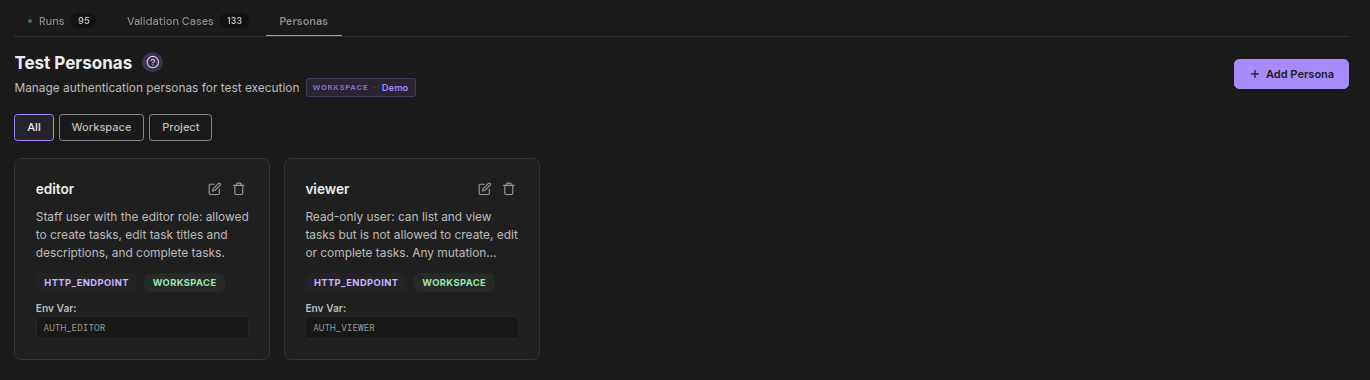
Start with workspace personas — one set of identities shared by every project. Add a project persona when one project's service has its own user pool, or needs an identity the others shouldn't see. A project persona with the same name as a workspace persona replaces it for that project: the narrowest scope wins, and that one resolution is used everywhere — test generation, journey binding, and the credentials compiled into the verifier binary — so a test can never be bound to one identity and run as another.
Each persona defines:
- Name — must match the persona name your tests reference (e.g.
admin1,user1) - Description — what this persona can and can't do (the test generator reads this when assigning personas to journeys)
- Auth type — how the verifier obtains credentials (see Auth types below)
- Scope —
WorkspaceorProject(see the table above). Scope is fixed at creation; a persona inherited from the workspace shows its scope as a badge in the Validation Center and is edited from Workspace Settings - Environment variable — the name of the CI secret that will carry this persona's credentials at run time (convention:
AUTH_<PERSONA_NAME_UPPER>) - Browser login (optional) — how a browser signs in as this persona, for browser-based verification: the login page URL, the fields to type in order, the accessible name of the submit button, and optionally the page you land on and how long a session lasts. Each typed value comes from your own machine at run time, from an environment variable whose name starts with
DZ_UI_or from a command your CLI runs, and is never stored by Dezycro. A field set to Literal text is stored as typed and visible to everyone who can read the persona, so don't put secrets in it. Leave the box unchecked unless UI verification is enabled for your workspace.
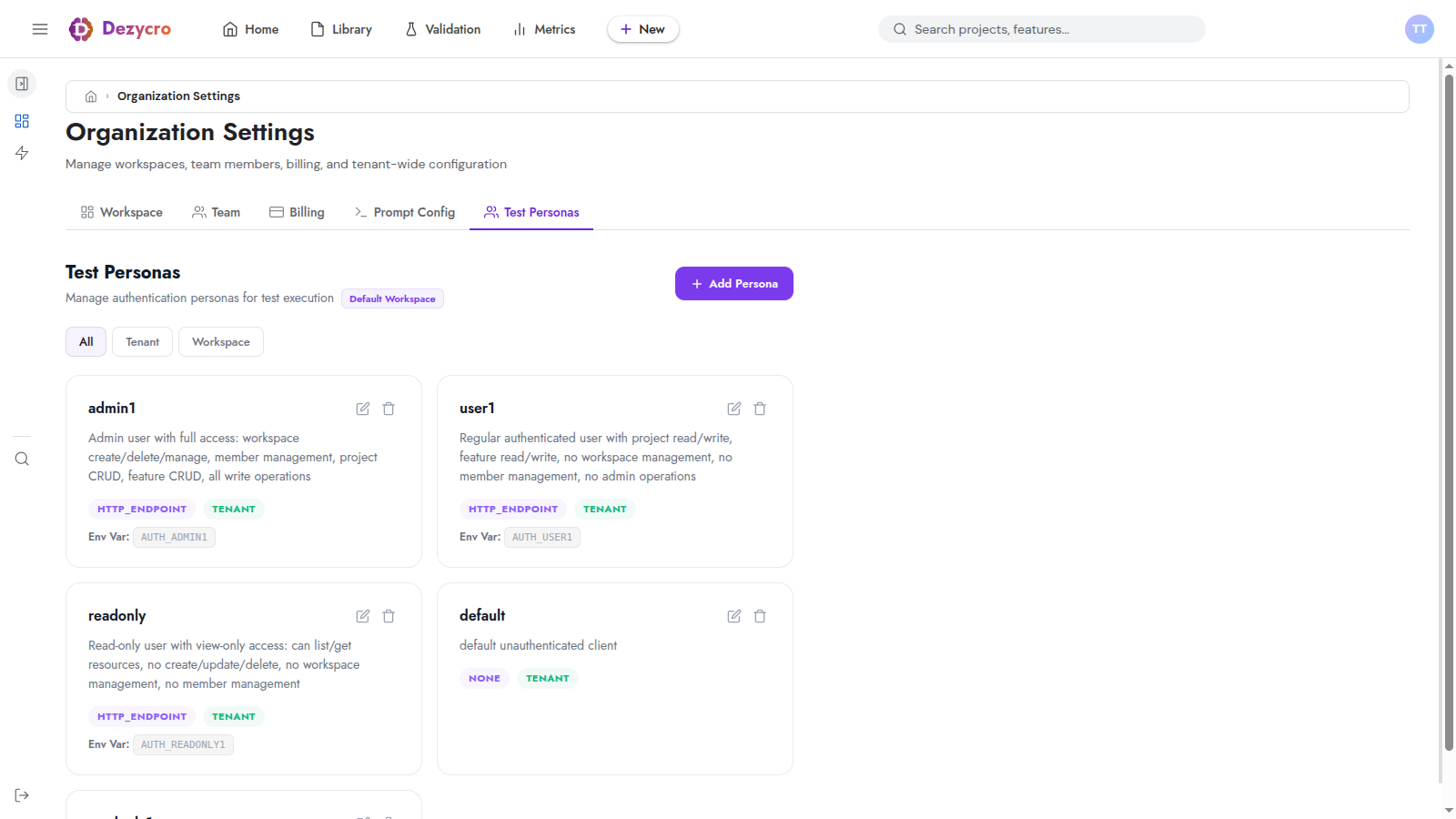
Click + Add Persona to open the create dialog:
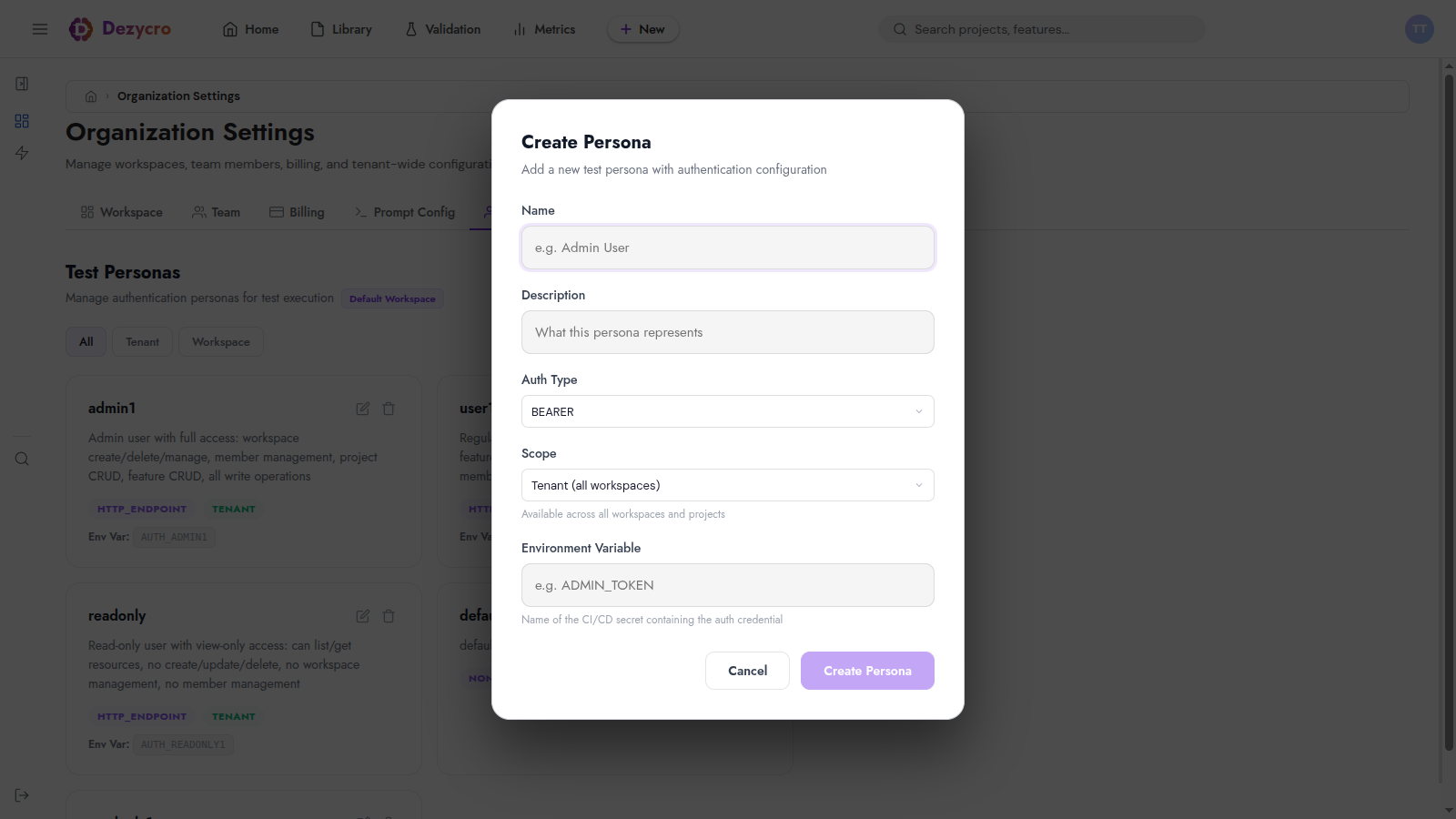
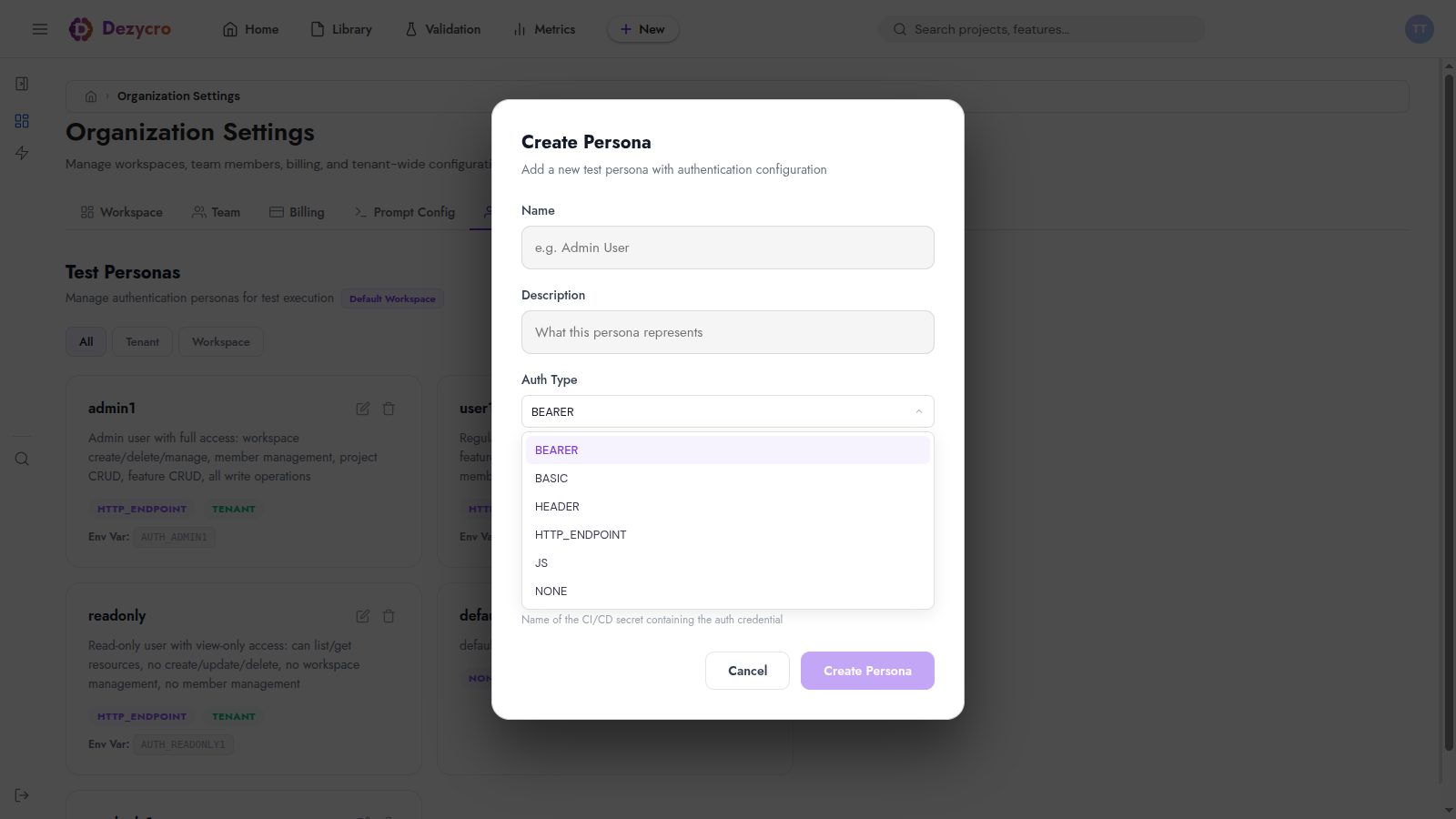
The Auth Type dropdown determines how the verifier gets a token for this persona:
Auth types
The verifier ships with six auth strategies. Pick the one that matches how your service issues tokens.
Calls a token endpoint (OAuth2 password grant, OIDC, custom dev login route) once per run, caches the response, and attaches the token to every request. This is what widgets-api uses.
Env var contents for admin1 (JSON, serialized into the single AUTH_ADMIN1 env var):
{
  "url":          "https://auth.acme.example/oauth/v2/token",
  "method":       "POST",
  "headers":      { "Content-Type": "application/x-www-form-urlencoded" },
  "body":         "grant_type=password&client_id=widgets-api&username=admin@acme.example&password=hunter2",
  "tokenPath":    "access_token",
  "headerName":   "Authorization",
  "headerPrefix": "Bearer "
}
| Field | Default | Notes |
|---|---|---|
url |
— required | Token endpoint |
method |
"POST" |
HTTP method (uppercased) |
headers |
{} |
Request headers; "Host" is honored if you need to override the vhost |
body |
"" |
Request body — form-encoded or JSON, whatever the endpoint expects |
tokenPath |
"access_token" |
Top-level JSON field in the response that holds the token. Nested paths (data.token) are not supported — the lookup is a flat map access. |
headerName |
"Authorization" |
Header to send on subsequent test requests |
headerPrefix |
"Bearer " |
Prefix prepended to the token (mind the trailing space) |
Constraints:
- The token endpoint must return JSON. Plain-text token responses aren't supported — wrap them in JSON or pick a different auth type.
- The field named by
tokenPathmust be a string and non-empty. - The request has a fixed 30-second timeout.
- The result is cached per-persona for the lifetime of one verifier run, so the endpoint is called at most once per persona per run. Concurrent journeys for the same persona share one token via singleflight.
A static bearer token. Use for long-lived service accounts or pre-minted PATs.
If widgets-api minted a pre-shared service account token instead of issuing them via OIDC, admin1 would look like:
Verifier sends Authorization: Bearer <token>.
HTTP Basic auth — username + password, base64-encoded into the Authorization header.
Configuration for a hypothetical Basic-auth widgets-api:
Arbitrary static headers. Use for API keys, signed tokens, or any auth scheme where headers are pre-known and don't need to be exchanged.
If widgets-api authenticated by API key, admin1 would carry:
The verifier merges these headers into every request.
Custom JavaScript for exotic auth (request signing, HMAC, TOTP, MFA). The script is registered with Dezycro server-side and embedded into the verifier binary; the env var just supplies inputs.
If widgets-api signed requests with HMAC, admin1 would carry the keying material:
The script receives a filtered process.env (AUTH_*, API_*, DEZYCRO_*) plus the JSON above, and must return { headers: { ... } }.
No auth headers. Explicit documentation that a persona is deliberately unauthenticated — for testing public endpoints or anonymous-user flows.
No credentials needed in CI for NONE personas. For widgets-api, you might add an anon persona of type NONE to assert "POST /widgets should return 401 to anonymous clients."
Persona design tips
Personas are applied when a feature's tests are generated — after adding or changing one, regenerate the feature's tests. The full set of rules for personas the generator can use is in Making your API verifiable.
- Cover each distinct authorization tier. At minimum: one admin, one regular user, one read-only / unauthorized counter-example. The test generator uses your descriptions to decide which persona should hit which endpoint and to write negative-case assertions (e.g. "readonly should 403 on this POST").
- Be specific in descriptions. For
widgets-api, "admin1: can create, list, and delete widgets" is OK. "admin1: can create / list / delete widgets in any workspace; cannot impersonate other organizations; widget bodies must be ≤ 4 KB" is much better — the generator writes both positive and negative tests from this. - Match names to your auth realm. If your tests reference
widgets_adminandwidgets_partner, name the personas the same. The verifier's persona-resolution is name-based. - Use
Workspacescope for shared identities,Projectscope for a project's own user pool. Forwidgets-api, if every project in the workspace shares the same admin/user/readonly identities, all three are workspace personas. Ifwidgets-apihas its own low-privilegeadmin1that the other projects'admin1shouldn't stand in for, create it as a project persona with the same name — it overrides the workspace one for that project only.
Local development
For local /<prefix>:dz-verify runs, credentials live in .dezycro/auth.local.json (gitignored). This file references secrets indirectly so plaintext credentials never enter the repo. /dezycro:init creates and maintains it for you.
auth.local.json for widgets-api
All three personas, with passwords pulled from a local secrets directory:
{
  "version": 1,
  "personas": {
    "admin1": {
      "envVar": "AUTH_ADMIN1",
      "type":   "http_endpoint",
      "config": {
        "url":    "https://auth.acme.example/oauth/v2/token",
        "method": "POST",
        "headers": { "Content-Type": "application/x-www-form-urlencoded" },
        "body":   "grant_type=password&client_id=${WIDGETS_CLIENT_ID}&username=admin@acme.example&password=${ADMIN_PASSWORD}"
      }
    },
    "user1": {
      "envVar": "AUTH_USER1",
      "type":   "http_endpoint",
      "config": {
        "url":    "https://auth.acme.example/oauth/v2/token",
        "method": "POST",
        "headers": { "Content-Type": "application/x-www-form-urlencoded" },
        "body":   "grant_type=password&client_id=${WIDGETS_CLIENT_ID}&username=user@acme.example&password=${USER_PASSWORD}"
      }
    },
    "readonly1": {
      "envVar": "AUTH_READONLY1",
      "type":   "http_endpoint",
      "config": {
        "url":    "https://auth.acme.example/oauth/v2/token",
        "method": "POST",
        "headers": { "Content-Type": "application/x-www-form-urlencoded" },
        "body":   "grant_type=password&client_id=${WIDGETS_CLIENT_ID}&username=readonly@acme.example&password=${READONLY_PASSWORD}"
      }
    }
  },
  "secrets": {
    "WIDGETS_CLIENT_ID":  "!file:~/.dezycro/secrets/widgets_client_id",
    "ADMIN_PASSWORD":     "!file:~/.dezycro/secrets/widgets_admin",
    "USER_PASSWORD":      "!file:~/.dezycro/secrets/widgets_user",
    "READONLY_PASSWORD":  "!cmd:op read op://Private/widgets-api/readonly/password"
  }
}
${NAME} placeholders inside personas[].config are resolved from the secrets block before the env var is serialized. Secrets can come from local files, environment variables, or shell commands (1Password, pass, etc.) — see the backend table below.
Secret backends
Pick whatever you already have:
| Backend | Example value |
|---|---|
| Plain file (chmod 600) | !file:~/.dezycro/secrets/admin1 |
| Process env | !env:ADMIN_PASSWORD |
| 1Password CLI | !cmd:op read op://Private/MyApp/admin/password |
pass / gopass |
!cmd:pass show myapp/admin |
| macOS Keychain | !cmd:security find-generic-password -a $USER -s myapp-admin -w |
| GCP Secret Manager | !cmd:gcloud secrets versions access latest --secret=myapp-admin |
For !cmd: the shell is /bin/sh -c, output is trimmed, and a non-zero exit or empty stdout is treated as an error.
How /<prefix>:dz-verify uses it
- Loads
.dezycro/auth.local.json - Resolves every
secrets[*]reference (first error aborts) - Substitutes
${NAME}placeholders inside eachpersonas[*].config JSON.stringifys each resolved config and exports it as the named env var- Runs the verifier binary
- Unsets the env vars when the run finishes — they never land in shell history or parent-process env
For the full local flow including /dezycro:init's interactive setup, see the Dezycro CLI install guide.
In CI
CI uses the same persona definitions and the same auth-config JSON shapes — you just skip the .dezycro/auth.local.json indirection and store the pre-resolved JSON directly as CI secrets, one per persona. The CI Setup guide walks through the full pipeline, including how to wire each persona's secret into the run-dezycro-tests step and how to handle per-environment credentials.
Troubleshooting
authenticator '<persona>' not configured (check AUTH_CONFIG_<persona> env var)
The verifier couldn't find an env var named by its embedded AUTH_CONFIG. Check:
- The persona's
Environment Variablein the UI matches what the verifier expects — convention isAUTH_<NAME>uppercased. - The CI secret (or
auth.local.jsonentry) is actually set and non-empty. - For local runs, every
${…}placeholder in the persona's config resolved (no stale!file:path, no missing!env:var, no command that returned empty stdout).
token endpoint returned status 401
The http_endpoint auth call itself failed — wrong client_id, wrong credentials, or wrong grant type for that endpoint. Reproduce with curl -d '<body>' '<url>' using the resolved values to confirm.
token field 'access_token' not found or empty in response
tokenPath doesn't match the response shape. tokenPath is a top-level field name — nested paths like data.token are not supported. Inspect the response with curl and either use the actual top-level field (common alternatives: id_token, accessToken, token), or, if the token is genuinely nested, change the endpoint's response shape on your side.
Tests pass locally but 401 in CI
The AUTH_<PERSONA> secret value differs from what auth.local.json resolves to. Common causes: secret editor stripped quotes; secret holds the token directly instead of the full auth-config JSON; the env var was set on the wrong scope (repo vs. environment) and the workflow runs in a different scope.
Secrets leak into logs
They shouldn't — the verifier and /<prefix>:dz-verify log only persona names and env-var names, never values. The run-dezycro-tests action redacts them too. If you see a literal token in a log, file an issue.