CI Setup
This page walks through wiring Dezycro into your CI pipeline end-to-end: ingesting your OpenAPI spec on every release, running Dezycro-generated tests with proper persona auth on every PR, and tying it all back to your project's workbook.
We use a fictional widgets-api (Quarkus, OIDC-secured) as the running example so every snippet has somewhere real to land. Replace the names and URLs with yours.
Two reusable actions live at github.com/Dezycro/github-actions. The rest of this guide is about how to assemble them.
What the finished pipeline looks like
flowchart TB
  subgraph validate ["pull_request — validate behavior"]
    direction TB
    V1["build app + run container"] --> V2["run-dezycro-tests<br/>pulls the latest verifier<br/>runs as personas"]
    V2 --> V3["Results in workbook<br/>PR status check"]
  end
  subgraph publish ["push to main — publish the API shape"]
    direction TB
    P1["build app + dump /q/openapi"] --> P2["ingest-to-dezycro<br/>source-type=OPENAPI"]
    P2 --> P3["Dezycro regenerates<br/>journeys & test cases"]
  end
Two pipelines, both terminating in the workbook: one publishes the API shape, the other validates behavior against it.
Prerequisites
Before either action will work you need:
- A Dezycro project with PRDs and TRDs already created.
- An OpenAPI spec served by your app. The OpenAPI Specs guide covers the per-framework setup (Quarkus + SmallRye is what we recommend, and what
widgets-apiuses). - A Dezycro PAT with API scope — generate it under Account settings → API Tokens in app.dezycro.ai.
- A registry PAT that can pull the test image (only needed for
run-dezycro-tests).
The next two sections cover the rest — defining the personas your tests will run as, and collecting the IDs CI needs to refer to your org / workspace / project.
Define your personas
CI runs Dezycro-generated tests as named users (admin1, user1, readonly1, …). Each one is a persona with a role, a description, and an auth strategy — defined in the account menu → Workspace settings → Test Personas (or, for one project only, Validation Center → Personas). See Personas & Auth.
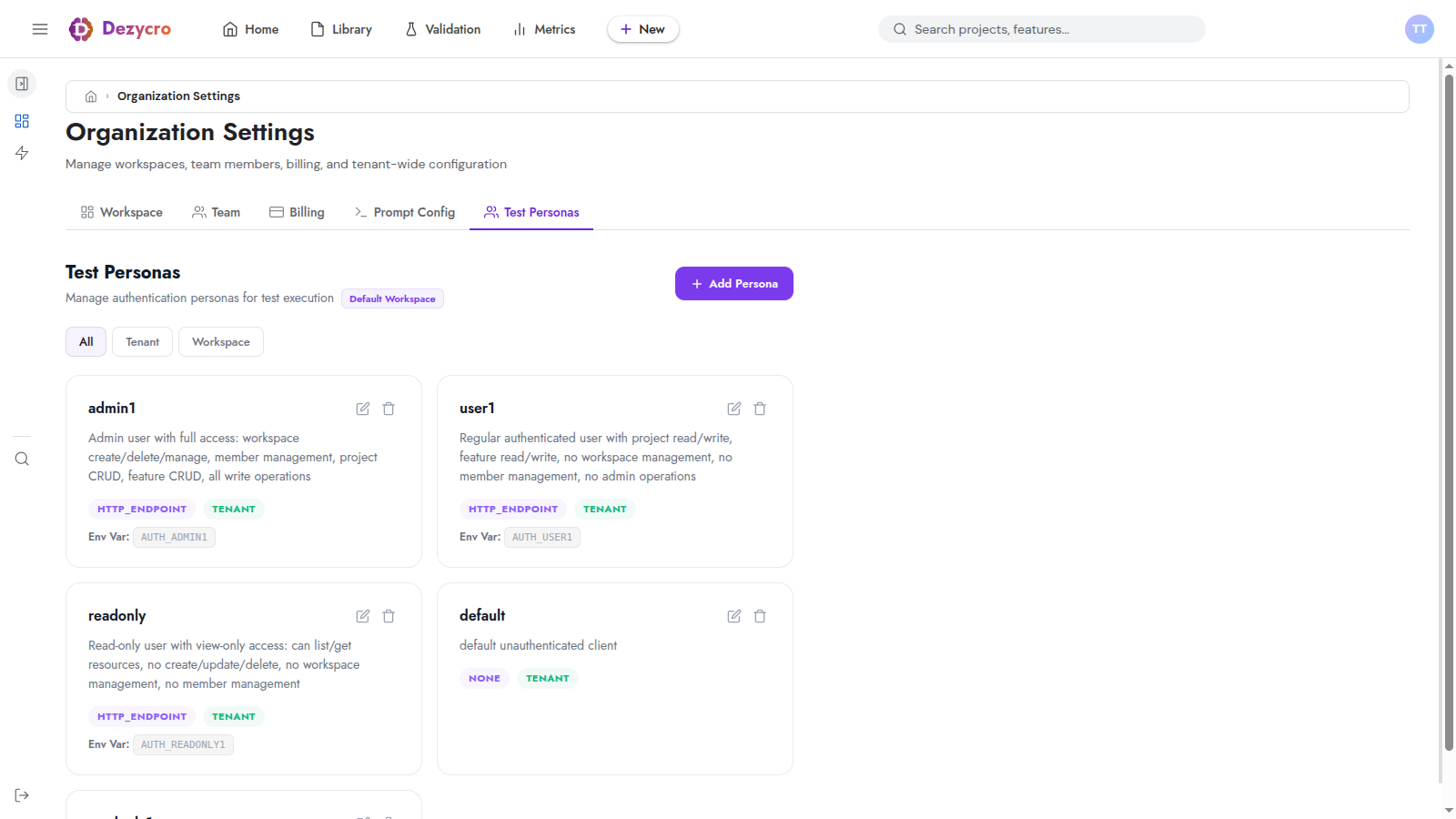
For widgets-api we'd create three:
admin1— can create, list, and delete widgetsuser1— can create and list, but not deletereadonly1— can only list (drives negative-case assertions like "POST should 403")
For each persona, you set:
- Name — must match the persona name your tests reference
- Description — the test generator reads this to assign personas to journeys, so be specific about what this user can and cannot do
- Auth type —
HTTP_ENDPOINT,BEARER,HEADER,BASIC,JS, orNONE. Picks the shape of the credential the verifier expects at run time. - Environment variable — the
AUTH_<NAME>env var the verifier will read at run time. This is the secret CI will populate.
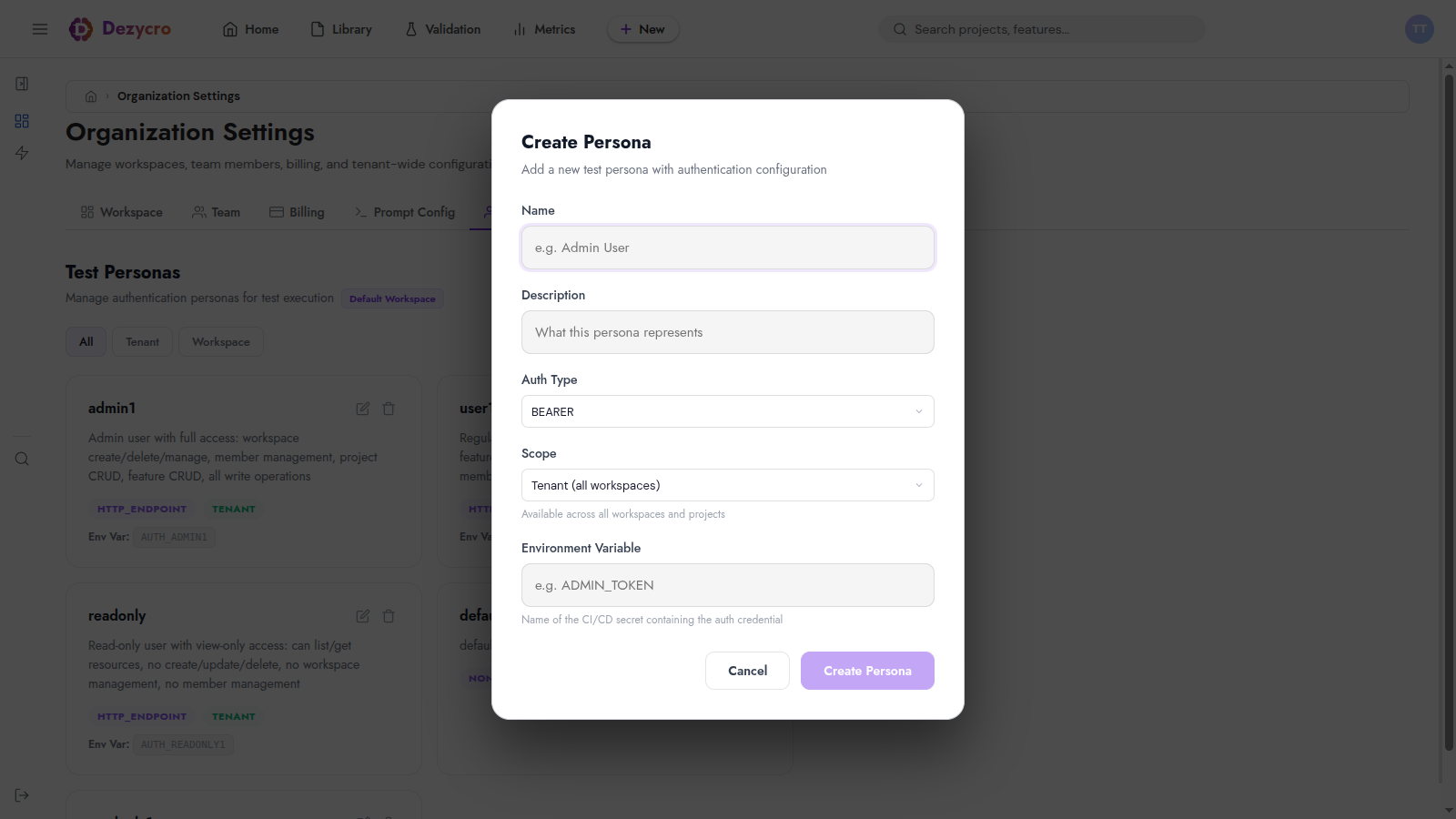
Configure personas before generating tests
The test generator decides which persona drives each journey at generation time. If your project has no personas (or only default), every journey runs unauthenticated and won't reach any endpoint behind auth. Set personas up first, then trigger test generation.
For the full conceptual reference — including the auth-type catalog (what JSON each type expects), local-dev .dezycro/auth.local.json setup, and persona design tips — see the Personas & Auth guide.
Finding your IDs in the app
Three IDs feed into the workflow file. Each one has a copy button in the UI.
Account menu → Organization settings → Team. Click the chip next to "Organization ID" to copy.
Used by run-dezycro-tests to locate the test image at registry.dezycro.ai/<org-id>/<project-id>:latest.
Account menu → Workspace settings → Members. Click the Workspace ID chip next to the "Workspace Members" heading.
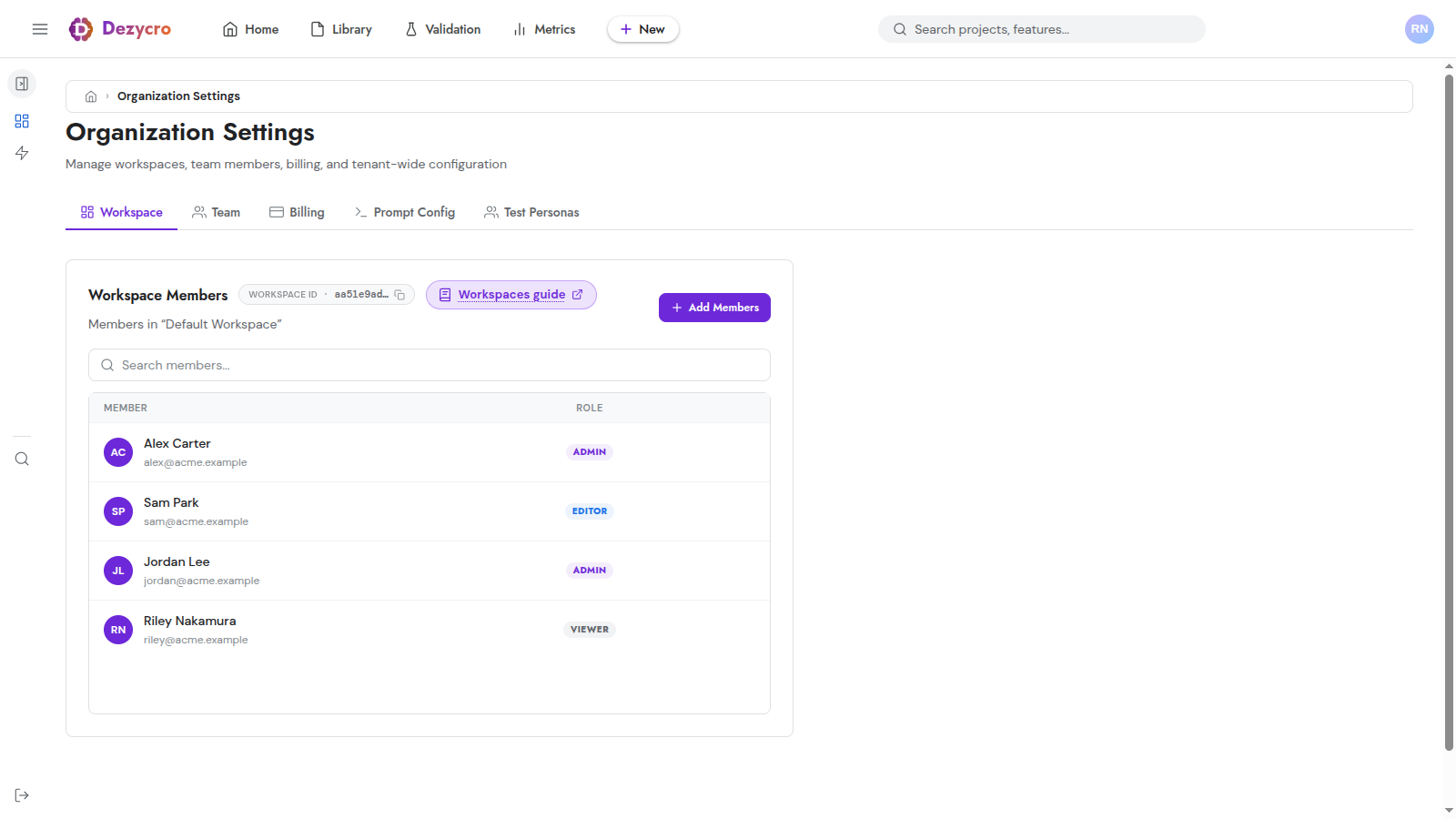
Used by ingest-to-dezycro — documents land under a specific workspace.
Open the project. The Project ID chip sits next to the project title at the top of the page.
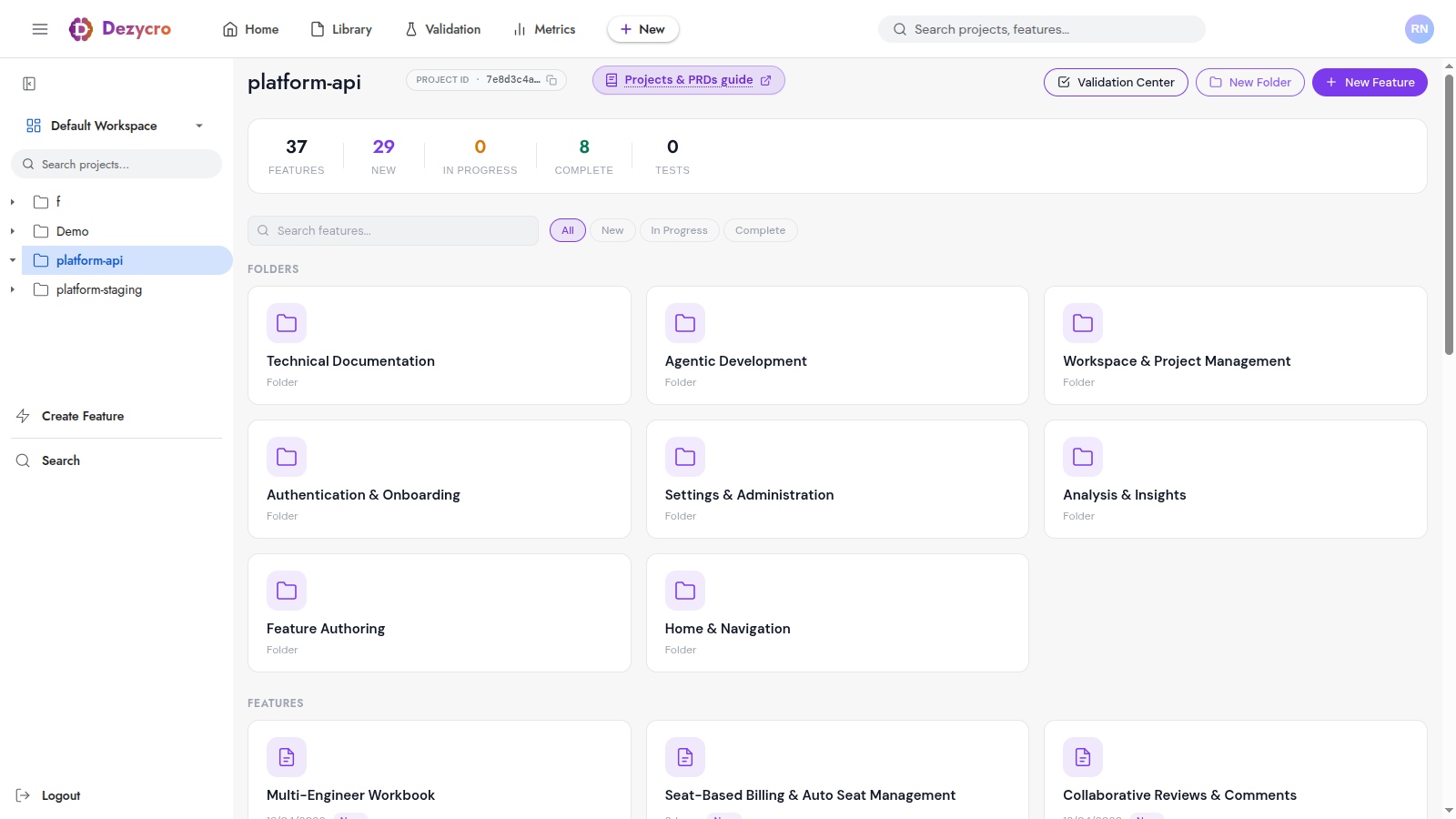
Used by both actions — ingest-to-dezycro to bind documents to the project, run-dezycro-tests to identify which project's tests to pull.
Secrets and variables
Set these once on your repository. We use GitHub Actions UI as the example; Forgejo / GitLab / Bitbucket are identical concepts under different names.
Repo variables (non-secret IDs)
| Variable | Source | Purpose |
|---|---|---|
DEZYCRO_ORGANIZATION_ID |
Org ID copy chip above | Identifies the test image to pull |
DEZYCRO_WORKSPACE_ID |
Workspace ID copy chip above | Identifies where docs ingest |
DEZYCRO_PROJECT_ID |
Project ID copy chip above | The project to ingest into / pull tests for |
Repo secrets
| Secret | What it holds |
|---|---|
DEZYCRO_API_TOKEN |
The Dezycro PAT |
DEZYCRO_REGISTRY_TOKEN |
The registry PAT |
AUTH_ADMIN1 |
Pre-resolved auth-config JSON for the admin1 persona |
AUTH_USER1 |
Same shape, for user1 |
AUTH_READONLY1 |
Same shape, for readonly1 |
What goes in each AUTH_<PERSONA> secret
The entire JSON config for that persona — same shape as the config block in .dezycro/auth.local.json, but on a single line and with secrets pre-substituted. For widgets-api, AUTH_ADMIN1 holds:
{"url":"https://auth.acme.example/oauth/v2/token","method":"POST","headers":{"Content-Type":"application/x-www-form-urlencoded"},"body":"grant_type=password&client_id=widgets-api&username=admin@acme.example&password=hunter2","tokenPath":"access_token","headerName":"Authorization","headerPrefix":"Bearer "}
AUTH_USER1 and AUTH_READONLY1 are the same shape with username and password swapped. For BEARER personas it's simpler — {"token": "..."}; for NONE, just {}. The full per-auth-type shape catalog is in Personas & Auth → Auth types.
Storing the JSON cleanly:
- Single-line JSON in the secret. Use a minifier locally:
jq -c . < admin1.json | pbcopy. - If your secret store strips characters (some do), base64-encode the JSON instead and decode it into the env var at workflow level.
Pipeline 1: Ingest the OpenAPI spec on main
Whenever main advances, push the freshest spec into Dezycro so journey generation tracks the real API shape.
name: Dezycro — ingest spec

on:
  push:
    branches: [main]

jobs:
  ingest:
    runs-on: ubuntu-latest
    steps:
      - uses: actions/checkout@v4

      - uses: actions/setup-java@v4
        with:
          distribution: temurin
          java-version: '21'

      - name: Build and start widgets-api
        run: |
          ./gradlew quarkusBuild
          java -jar build/quarkus-app/quarkus-run.jar &
          echo $! > /tmp/app.pid
          until curl -sf http://localhost:8080/q/health; do sleep 1; done

      - name: Dump OpenAPI spec
        run: curl -sf 'http://localhost:8080/q/openapi?format=json' > api-spec.json

      - uses: Dezycro/github-actions/ingest-to-dezycro@main
        with:
          token:        ${{ secrets.DEZYCRO_API_TOKEN }}
          workspace-id: ${{ vars.DEZYCRO_WORKSPACE_ID }}
          project-id:   ${{ vars.DEZYCRO_PROJECT_ID }}
          paths:        api-spec.json
          source-type:  OPENAPI

      - name: Stop widgets-api
        if: always()
        run: kill "$(cat /tmp/app.pid)" || true
The upload is upsert by document name (overrideByName=true), so re-runs replace the previous spec rather than piling up duplicates. Dezycro re-derives journey execution plans from the new spec and the test generator picks up any new endpoints on its next run.
You can ingest other documents (PRDs, TRDs, runbooks, ADRs) the same way — just drop source-type and adjust paths. The default source-type is DOC.
Pipeline 2: Run generated tests on every PR
This is the main quality gate. Spin up your service, point run-dezycro-tests at it with the right persona credentials, fail the PR if anything regresses.
name: Dezycro — E2E tests

on:
  pull_request:

jobs:
  e2e:
    runs-on: ubuntu-latest
    services:
      widgets-api:
        image: ghcr.io/acme/widgets-api:${{ github.sha }}
        ports: ['8080:8080']
        env:
          QUARKUS_PROFILE: ci

    steps:
      - uses: Dezycro/github-actions/run-dezycro-tests@main
        env:
          AUTH_ADMIN1:    ${{ secrets.AUTH_ADMIN1 }}
          AUTH_USER1:     ${{ secrets.AUTH_USER1 }}
          AUTH_READONLY1: ${{ secrets.AUTH_READONLY1 }}
        with:
          api-url:         http://localhost:8080
          organization-id: ${{ vars.DEZYCRO_ORGANIZATION_ID }}
          project-id:      ${{ vars.DEZYCRO_PROJECT_ID }}
          registry-token:  ${{ secrets.DEZYCRO_REGISTRY_TOKEN }}
What happens under the hood:
- The action pulls
registry.dezycro.ai/<org-id>/<project-id>:latest— your project's compiled test image. - Forwards every
AUTH_*env var on the step into the container. - The verifier inside the container reads
AUTH_CONFIG(compiled in from your project's persona setup), then for each persona looks at the matchingAUTH_<NAME>env var and uses it to obtain a token (or apply static headers). - Runs every generated journey, attaches results to the workbook, exits non-zero on failure.
The PR check shows pass / fail and links into the run in app.dezycro.ai.
Pipeline 3: Combined "build, ingest, test"
If your service builds cleanly and you have the room, do everything in one workflow:
name: Dezycro

on:
  push:
    branches: [main]

jobs:
  full:
    runs-on: ubuntu-latest
    steps:
      - uses: actions/checkout@v4
      - uses: actions/setup-java@v4
        with: { distribution: temurin, java-version: '21' }

      - name: Build app
        run: ./gradlew quarkusBuild

      - name: Start app and capture spec
        run: |
          java -jar build/quarkus-app/quarkus-run.jar &
          echo $! > /tmp/app.pid
          until curl -sf http://localhost:8080/q/health; do sleep 1; done
          curl -sf 'http://localhost:8080/q/openapi?format=json' > api-spec.json

      - uses: Dezycro/github-actions/ingest-to-dezycro@main
        with:
          token:        ${{ secrets.DEZYCRO_API_TOKEN }}
          workspace-id: ${{ vars.DEZYCRO_WORKSPACE_ID }}
          project-id:   ${{ vars.DEZYCRO_PROJECT_ID }}
          paths:        api-spec.json
          source-type:  OPENAPI

      - uses: Dezycro/github-actions/run-dezycro-tests@main
        env:
          AUTH_ADMIN1:    ${{ secrets.AUTH_ADMIN1 }}
          AUTH_USER1:     ${{ secrets.AUTH_USER1 }}
          AUTH_READONLY1: ${{ secrets.AUTH_READONLY1 }}
        with:
          api-url:         http://localhost:8080
          organization-id: ${{ vars.DEZYCRO_ORGANIZATION_ID }}
          project-id:      ${{ vars.DEZYCRO_PROJECT_ID }}
          registry-token:  ${{ secrets.DEZYCRO_REGISTRY_TOKEN }}

      - name: Stop app
        if: always()
        run: kill "$(cat /tmp/app.pid)" || true
This is good for small services where the spec ingest and test run can share one build of the app.
Per-environment credentials
The same persona usually needs different credentials per environment (dev vs. staging vs. prod). Two patterns:
- Different secrets per environment. Use GitHub environment secrets — the same
AUTH_ADMIN1name resolves to different values depending on the job'senvironment:setting. - Different env var names per environment.
AUTH_ADMIN1_DEVvsAUTH_ADMIN1_STAGING, then conditionally map:env: { AUTH_ADMIN1: ${{ matrix.env == 'staging' && secrets.AUTH_ADMIN1_STAGING || secrets.AUTH_ADMIN1_DEV }} }.
Pick whichever matches how your CI is already structured.
Action references
ingest-to-dezycro
| Input | Required | Default | Description |
|---|---|---|---|
token |
yes | — | Dezycro API PAT |
workspace-id |
yes | — | Workspace ID |
project-id |
yes | — | Project ID to associate documents with |
paths |
yes | — | Newline-separated file paths/globs to ingest |
endpoint |
no | api.dezycro.io |
API host (no protocol, no trailing slash) |
source-type |
no | DOC |
Document source type (DOC, OPENAPI, …) |
insecure |
no | false |
Skip TLS verification (dev environments with self-signed certs) |
run-dezycro-tests
| Input | Required | Default | Description |
|---|---|---|---|
api-url |
yes | — | Base URL of the API under test |
organization-id |
no¹ | — | Dezycro organization ID |
project-id |
no¹ | — | Dezycro project ID |
image |
no¹ | — | Full image ref — overrides organization-id / project-id |
registry-host |
no | registry.dezycro.ai |
Docker registry host |
registry-token |
no | — | PAT for registry auth |
registry-username |
no | pat |
Username for registry auth |
verbose |
no | true |
Verbose test output |
report-format |
no | text |
text or json |
skip-tests |
no | — | Comma-separated test IDs to skip (prefix match) |
skip-pull |
no | false |
Skip docker pull (image already loaded locally) |
¹ Either image or both organization-id and project-id are required. Output: exit-code — the test runner's exit code.
The AUTH_* forwarding pattern
The action forwards every env var that matches AUTH_* on its step into the verifier container with -e AUTH_FOO=.... You don't have to enumerate them inside with: — just set them in the step's env: block and they flow through. This is how persona credentials reach the verifier inside the container.
Versioning
The examples above pin to @main for simplicity. For production pipelines, pin to a release tag once the actions repo cuts one (recommended convention: @v1).
Troubleshooting
Workflow can't reach the registry / image pull fails
The DEZYCRO_REGISTRY_TOKEN secret needs registry-read scope for your organization's namespace. Generate a fresh PAT, paste it in, re-run.
authenticator '<persona>' not configured
Either the persona's AUTH_<PERSONA> repo secret is missing/empty, or the persona's Environment Variable in the UI doesn't match what the verifier expects. The convention is AUTH_<NAME> uppercased — verify both ends agree. See also the Personas & Auth troubleshooting for issues with the auth-config JSON itself.
Tests pass locally but 401 in CI
The AUTH_<PERSONA> secret value differs from what your local auth.local.json resolves to. Common causes:
- Secret editor stripped quotes (try base64-encoding).
- Secret holds only the token instead of the full auth-config JSON.
- The env var was set on the wrong scope (repo vs. environment) and the workflow targets the other scope.
Spec ingest succeeds but Dezycro shows no new endpoints
The upload is async — verifier-binary generation picks up the new document within a few seconds, but UI cache can lag. Hard-refresh the project page. If the endpoints still aren't there, check the document name in the workbook: ingestion is upsert-by-name, so if you renamed the spec file you may have created a second document instead of replacing the first.
Secrets leak into logs
They shouldn't — the verifier and the action both log only persona names and env var names. If you see a literal token in a log, file an issue.