Confluence connector
Import features straight from Confluence: pick a page, and Dezycro turns it into a feature with that page as its PRD (and optionally a second page as its TRD). You choose whether Dezycro copies the content or links to it — with Link, Confluence stays the source of truth and Dezycro never stores the raw content.
Connecting
The connection is per user — each teammate connects their own Atlassian account, and imports run with their Confluence permissions (you can only import pages you can read).
- Click New feature (New feature in the left rail, or New Feature on a project page) and pick Connectors.
- Click Connect Confluence. An Atlassian consent window opens — approve read access.
- You're returned to the wizard, connected.
Dezycro requests read-only scopes (spaces + pages). It never writes to your Confluence.
Managing the connection
The wizard shows who's connected and offers Disconnect. Disconnecting stops future imports and refreshes through that connection; documents already copied are unaffected, documents linked through it can no longer refresh until someone reconnects.
Importing a feature
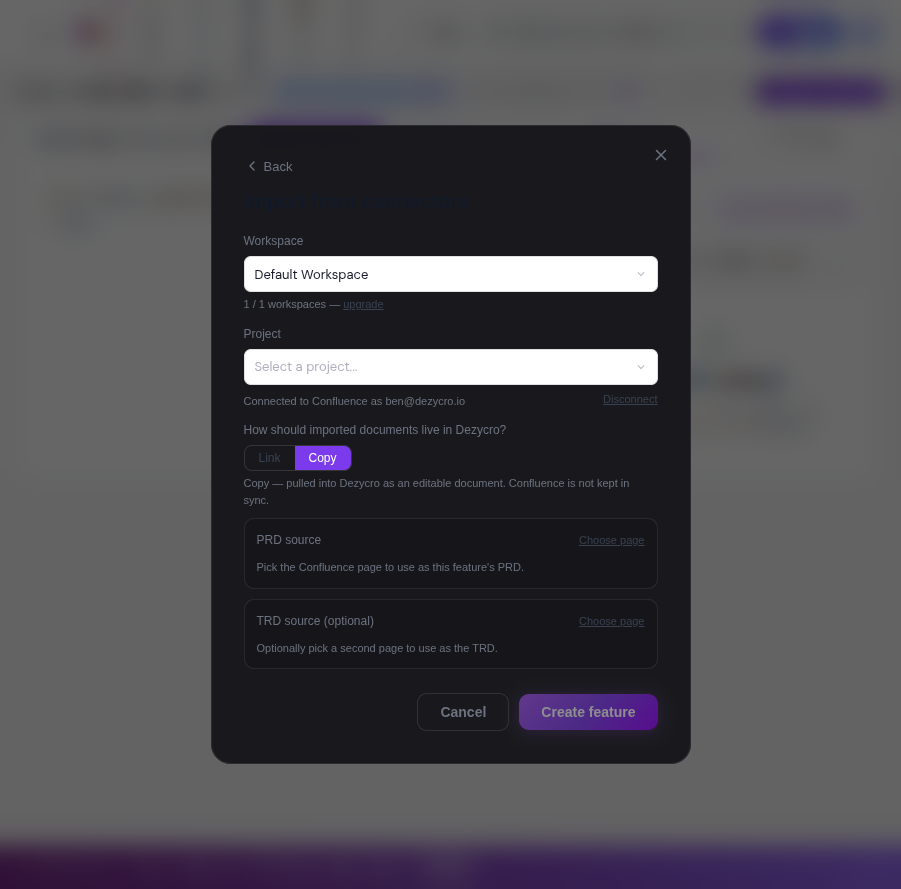
One import = one feature. The wizard walks you through:
- Copy or Link — the first choice, before anything else. This sets the default for the documents you pick (each document can still be overridden individually).
- PRD source (required) — browse a space or type to search page titles, then pick the page.
- TRD source (optional) — a second page to import as the feature's TRD.
- Name + placement — prefilled from the PRD page's actual content (same suggestion engine as the other on-ramps); edit freely. Placement supports the same folder suggestions as everywhere else.
- Create feature — you land in the new feature's PRD, same as any other creation path.
Copy vs Link
| Copy | Link | |
|---|---|---|
| Source of truth | Dezycro | Confluence |
| Editable in Dezycro | Yes | No — read-only |
| Content stored in Dezycro | Yes | Never — only a reference; content is fetched on demand and held in a short-lived cache (~10 minutes) |
| Stays in sync with Confluence | No | Yes — refresh any time |
| Choose per document | Yes | Yes |
Use Copy when the Confluence page was a starting point and Dezycro should own the document from now on. Use Link when Confluence remains where the team edits — reviewers, agents, and the verification pipeline always see the current page.
Working with linked documents
Linked documents are labelled "Source of truth: Confluence" wherever they appear — the document page and the editor both show the banner with:
- View in Confluence — jump to the source page
- Last synced — when the content was last fetched
- Refresh from source — pull the latest version now
Editing is disabled in Dezycro (including AI chat edits — the assistant will review and explain the document but directs changes to Confluence). To change a linked document, edit the page in Confluence and click Refresh from source.
Linked documents and verification
Test generation and the verifier read linked PRD/TRD content on demand through the stored connection — no one needs to be logged in for pipeline runs to see the current page. If the connection has been revoked or the page deleted, the pipeline fails with a clear error instead of silently treating the document as empty — reconnect Confluence (or re-import) to resolve it.
Troubleshooting
| Symptom | Cause / fix |
|---|---|
| Connectors tile says it isn't enabled | The Atlassian integration isn't configured for your Dezycro environment — contact your admin. |
| "Could not fetch linked source…" | The connection was revoked/deleted, or the source page is gone. Reconnect Confluence, or re-import the feature. |
| Search finds nothing | Search matches page titles (any part of the title, case-insensitive) within the selected space — check you're in the right space. |
| Consent window closes without connecting | Pop-up blocked, or the Atlassian account has no access to the site — allow pop-ups and retry. |
What's next
Jira and Notion connectors follow the same model and are on the roadmap.