The Workbook
The workbook is the working memory of a feature — the structured record of what's been decided, what's pending, what's been verified, and what's still open. PRDs and TRDs describe what should happen; the workbook records what's actually happening as the feature gets built.
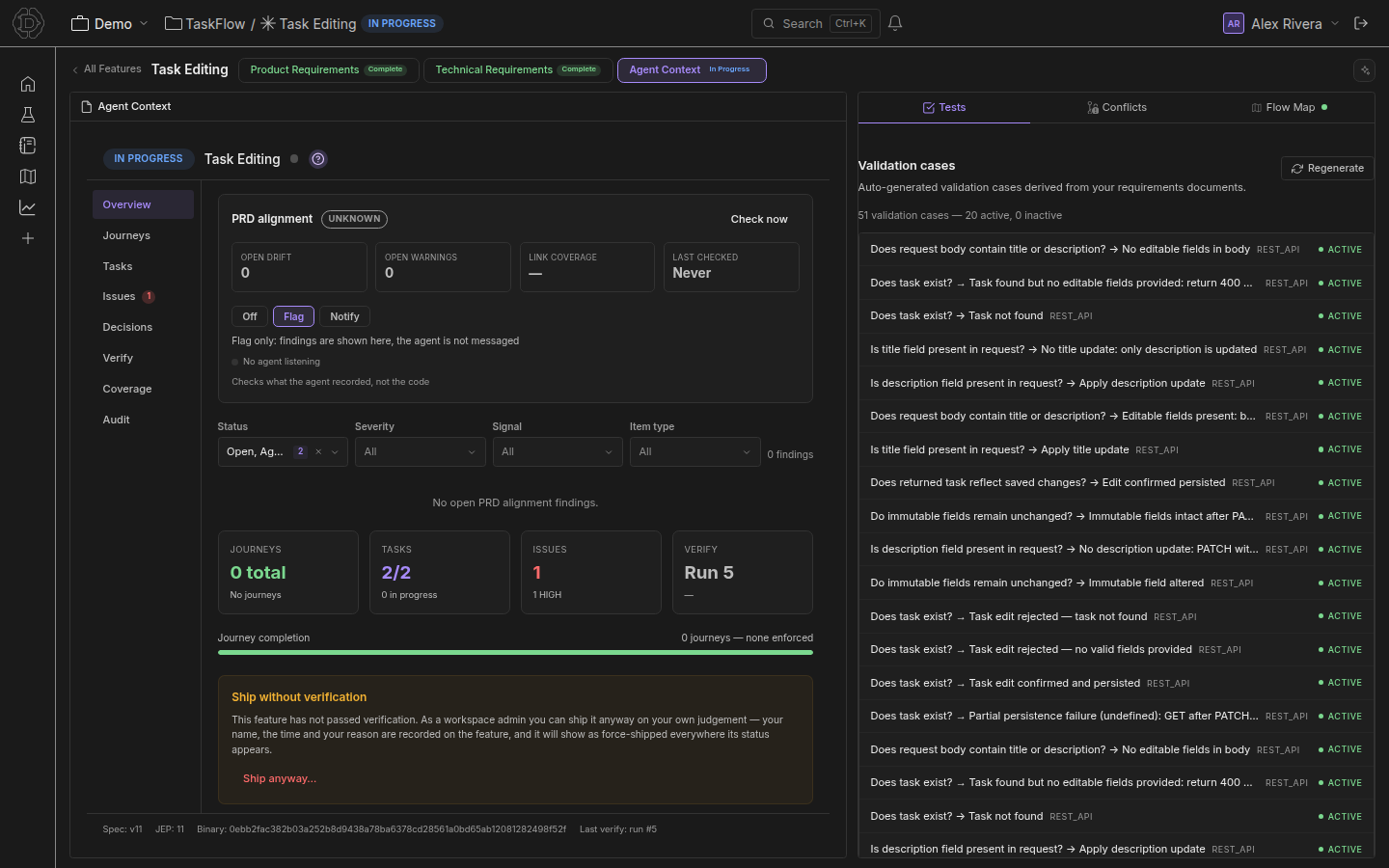
In the feature stepper it's labeled Agent Context (third stage, between Technical Requirements and Validation) because that's the role it plays at runtime: every Dezycro-aware AI agent — Claude Code, Cursor, the Companion, the verifier — reads the workbook to ground its next action. When the docs talk about "the workbook" or "the agent context," they're the same thing.
Who writes the workbook
Mostly the agent. In a typical agent-driven session:
- Companion (background) sweeps the conversation when something material happens and records decisions / issues / assumptions before they get lost. It's trigger-based and silent by default — entries land in the workbook without the developer having to step out of flow.
/<prefix>:dz-synclets the developer say "checkpoint this" explicitly — Companion reviews the recent edits, opens the right tasks/issues, and links the commits./<prefix>:dz-verifywrites journey results, coverage gaps, and run history.- Test generation writes journeys and intent links.
The human edits the workbook directly only for sharper-than-the-agent-knows nuance: marking an assumption invalidated, raising the severity on an issue, or promoting a journey from OBSERVED to ENFORCED.
This is why the workbook reads less like a doc and more like a database: it's curated by software for software, with human spot-corrections.
What's in it
The workbook surfaces split into eight sub-views in the UI. Each one is a typed log of a different kind of entry:
| Sub-view | What lives there |
|---|---|
| Overview | A roll-up: open issues, blocking journeys, recent decisions, latest verifier run |
| Journeys | Generated test journeys + their ENFORCED / OBSERVED state and last status |
| Tasks | Discrete units of work an engineer (human or agent) is responsible for |
| Issues | Bugs, blockers, dev problems with severity and resolution status |
| Decisions | Committed technical / product choices worth preserving |
| Verify | Triggers a verifier run and shows the result inline |
| Coverage | Per-intent / per-endpoint coverage map — what's tested vs what's just speced |
| Audit | Append-only log of every mutation, with timestamp and actor |
Journeys
A journey is a sequence of API calls that exercises a user-facing behavior end-to-end. Generated from the PRD (one journey per user story / acceptance criterion) and the OpenAPI spec, then run by the verifier on demand or in CI.
Each journey has:
- A name + description
- A linked PRD intent (the source statement) — used by the coverage report to map "did we test what the PRD promised?"
- An ordered list of steps (HTTP calls + assertions)
- An enforcement state —
ENFORCED(failure blocks the feature lifecycle from advancing) orOBSERVED(logged but non-blocking — useful for nice-to-haves or in-progress journeys) - A status —
PENDING/PASSING/FAILING/SKIPPED. Regenerating the feature's tests resets a journey whose tests changed toPENDING, and only a run of its current tests moves it again (see Run results)
Tasks
A task is a unit of work an engineer (human or agent) is responsible for. Each one has:
- A status:
PENDING→IN_PROGRESS→DONE→PUSHED→CONFIRMED(forward-only; a task that turns out wrong is markedINVALIDATEDrather than deleted) - Optional
pathRefs— files in the codebase the task touches. The Companion verify gate uses these to block transitions toDONEorPUSHEDwithout recent passing verifier evidence. - Optional links to journeys, decisions, or issues
Tasks describe work. They're the smallest planning unit.
Decisions
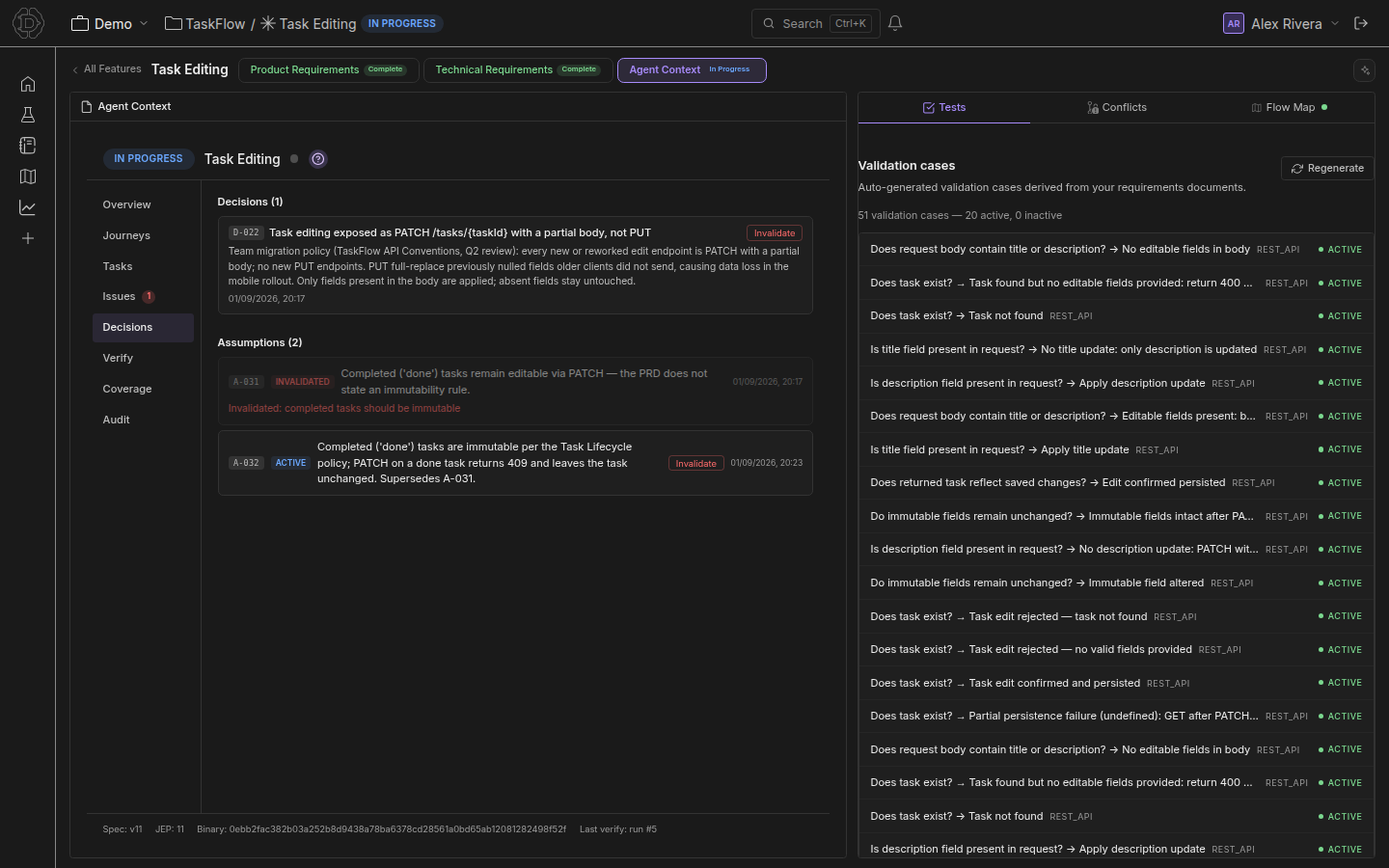
A decision is a committed technical or product choice worth preserving:
"We chose cursor-based pagination over offset for the activity feed."
Decisions have a summary, a rationale, and optional refs back to the journeys / intents they affect. They stay forever — they aren't "completed." If a decision turns out wrong, mark it INVALIDATED instead of deleting; the audit trail matters more than tidiness.
Issues
An issue is a current problem — a bug, a blocker, a flake — with a severity (HIGH / MEDIUM / LOW) and a forward-only status (OPEN → RESOLVED → PUSHED → CLOSED).
Issue vs task: an issue describes the problem; a task describes the work to fix it. Most fixes get both — one issue plus one task that links to it. The issue is what the verifier and coverage report read; the task is what shows up on someone's plate.
Assumptions
An assumption is a working belief that affects implementation but isn't verified:
"We're assuming the upstream API returns ISO-8601 timestamps."
Recording assumptions explicitly is what stops them from silently becoming bugs. When an assumption turns out wrong, mark it INVALIDATED and (usually) open a corresponding issue.
Companion logs assumptions whenever the developer says "I think…" / "I'm pretty sure…" / "this should be the case" in a way that affects code paths.
Blockers & required paths
Some features can't be fully verified until something external is in place — a Stripe webhook subscribed, an OAuth callback configured, a third-party fixture loaded. Record these as HIGH-severity issues: explicit prerequisites that must be satisfied before the verifier can run end-to-end.
A feature with open HIGH-severity issues can't auto-advance to VERIFIED, even if all its journeys pass — the agent knows it isn't actually proven.
Lifecycle stages
Each feature progresses through stages, driven by the workbook's contents:
stateDiagram-v2
  direction LR
  [*] --> DRAFT
  DRAFT --> APPROVED: flow graph approved
  APPROVED --> IN_PROGRESS: dz-work
  IN_PROGRESS --> VERIFIED: all enforced journeys pass
  VERIFIED --> IN_PROGRESS: a journey fails (auto-revert)
  VERIFIED --> SHIPPED: promote to regression
  IN_PROGRESS --> SHIPPED: admin force-ship (recorded)
  SHIPPED --> VERIFIED: un-ship
  state "ABANDONED (from DRAFT, APPROVED or IN_PROGRESS)" as ABANDONED
  IN_PROGRESS --> ABANDONED: abandon
  ABANDONED --> APPROVED: restore
Across the product UI these stages surface as a simpler feature status: NEW (DRAFT), READY (APPROVED / IN_PROGRESS), COMPLETE (VERIFIED / SHIPPED), and ABANDONED. A feature only ever shows as Complete once it has been verified against intent — finishing the documents alone never gets it there.
| Stage | Meaning |
|---|---|
| DRAFT | PRD/TRD being written; flow graph not yet approved; workbook empty |
| APPROVED | The flow graph has been approved — journeys exist and the workbook is initialized; coding can start |
| IN_PROGRESS | Implementation underway; some journeys may pass, tasks moving |
| VERIFIED | All ENFORCED journeys are PASSING, no open HIGH-severity issues, all journey-linked tasks are CONFIRMED, and the coverage report has no blocking gaps |
| SHIPPED | Promoted to the project's regression suite; read-only. Normally reached from VERIFIED; a workspace admin can also force-ship a feature that isn't verified, on the record |
| ABANDONED | Work intentionally parked (available from DRAFT, APPROVED, or IN_PROGRESS via the feature tile's Abandon action); Restore re-opens it back to APPROVED. Both actions are audited |
Transitions are automatic where possible. DRAFT → APPROVED happens when you approve the flow graph. As soon as the verifier reports all enforced journeys passing — with the issue, task, and coverage gates also clear — the feature auto-moves to VERIFIED (and auto-reverts to IN_PROGRESS if any gate stops holding). SHIPPED is the only deliberate promotion: it merges the feature into the project's regression suite (see Promotion to regression).
If you want to know why a feature is stuck on a stage, the Overview sub-view tells you exactly which gate hasn't been satisfied.
Shipping on an admin's judgement
Sometimes a feature has to ship before the verifier says so — the tests aren't representative yet, the environment can't be exercised, or the business has decided. A workspace admin can promote such a feature straight to SHIPPED with Ship anyway…. Open the feature, go to Agent Context → Overview, and scroll below the journey-completion bar: the Ship without verification panel is there only when the normal Promote path is closed.
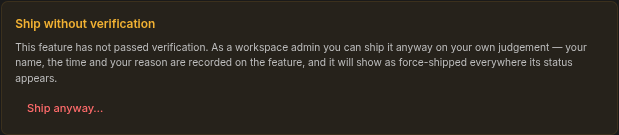
What makes this safe is that it is on the record, not silent:
- The confirm dialog requires typing the feature's exact name and a reason (up to 1,000 characters). Both are stored on the feature together with who did it, when, and the stage it was in at the time.
- The feature carries a Force-shipped badge wherever its status appears, with a tooltip showing who / when / why. The project's Complete count shows forced features separately —
12 (2 forced)— so a forced ship never hides among earned ones. - The action is audited like every other lifecycle change.
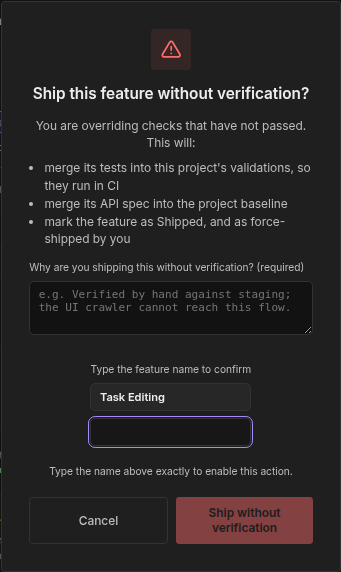
What the override skips is opinion: the VERIFIED requirement, the "at least one enforced journey" rule, and "all enforced journeys passing". Everything else about promotion is unchanged — see below.
Un-ship. SHIPPED is read-only, so a mistaken ship would otherwise lock the feature. A workspace admin can Un-ship… any shipped feature. A feature that earned SHIPPED through VERIFIED returns to VERIFIED; a force-shipped feature returns to the stage it was actually in when it was forced (for example IN_PROGRESS), and the Force-shipped badge is cleared with it. Un-shipping never grants a status the feature didn't earn.
Both actions require the workspace Admin role; editors can promote only through the normal verified path. See Roles & Permissions.
What promotion actually merges
Promoting a feature to SHIPPED — on the normal path or by force — merges three things into the project:
- Its published API spec into the workspace's API baseline, the spec that test generation for every other feature in the workspace builds on. This happens only if the feature published a spec.
- Its tests into the project's regression suite, so they keep running against every later change.
- Its decisions and assumptions into the project's Knowledge Base, so later PRDs, TRDs, chat answers, and agents can cite what was actually decided when the feature shipped.
Only the second needs tests; the first and third happen either way. A feature with no generated tests can still be promoted, on both paths: you keep (1) and give up (2) — the regression suite doesn't grow, so nothing will catch a later change that breaks this feature. The Ready to Promote and Ship without verification panels say so before you confirm, and the promote dialog's first bullet changes to "add nothing to this project's validations". (A feature whose generated plans are purely structural also adds nothing to the suite, but currently gets no such note.)
A feature's PRD and TRD don't wait for promotion: they're in the Knowledge Base as soon as they're written, whatever the feature's stage, and every passage carries the feature's stage so answers can tell a draft from a shipped feature. What promotion adds is the workbook's decisions and assumptions. Un-shipping the feature removes them again.
Documents on a feature
Each feature also carries two human-readable documents alongside the workbook:
| Type | Purpose |
|---|---|
| PRD | Product Requirement Document — user stories, acceptance criteria, pillars |
| TRD | Technical Requirement Document — architecture, data model, API contracts, failure modes, migration, open questions |
All three (PRD + TRD + workbook) are auto-created when you call create_feature. The documents start in DRAFT and the authoring flow walks them through IN_PROGRESS to COMPLETE. Every saved revision is kept as a version snapshot — old versions stay viewable.
How agents use the workbook
This is the part that most differentiates Dezycro from a doc tool: the workbook is structured exactly so that an agent can ground itself in seconds.
When /<prefix>:dz-work <feature> starts a session, the Dezycro CLI loads the entire workbook (overview + open issues + recent decisions + journeys + last verifier run) into the agent's context. The agent then reads:
- the PRD to learn what should happen,
- the TRD to learn how it's built,
- the workbook to learn what's already been decided, what's broken right now, and what's been verified so far.
That last category is what makes the difference between an agent that hallucinates and an agent that progresses. The PRD/TRD are aspirational; the workbook is current truth.
When the agent then does work — implements something, runs the verifier, hits a snag — it writes back:
- Decisions it made (via
add_decision) - Issues it found (via
add_issue) - Assumptions it relied on (via
add_assumption) - Tasks it completed (via
update_task)
Either explicitly (the developer typed /<prefix>:dz-sync) or implicitly (Companion noticed something worth recording).
Each item the agent records is linked to the part of the PRD it serves, and the PRD Alignment Detector checks those items against the PRD: it flags a task or decision that contradicts the PRD, drifts outside its scope, or isn't linked at all, and can tell the running agent to reconcile.
Editing the workbook
Three ways, all writing to the same store:
- Web UI —
app.dezycro.ai→ feature page → workbook sub-views. Canonical surface; every other path's mutations appear here in real time. - MCP —
add_decision,add_issue,add_assumption,update_task,create_task,link_artifact, etc. (see MCP server). - Dezycro CLI — Companion auto-logs during a session;
/<prefix>:dz-syncdoes the explicit checkpoint;/<prefix>:dz-verifywrites run results. (See Companion and slash commands.)
All three paths share the same audit log — the Audit sub-view shows every mutation with timestamp and actor (which user / which agent / which automation).
What the workbook is for
The workbook exists because PRDs and TRDs alone aren't enough to verify a feature is correctly built. A PRD says what should happen; the workbook records what was decided, what was assumed, what was actually tested, and what's still open.
It's also what makes Dezycro safe to leave an agent unattended on. Because every mutation is logged, every assumption is explicit, and every gate to VERIFIED is mechanical, you can audit what the agent did after the fact — and you can tell whether it actually finished or just thinks it did.
The verifier consumes the workbook (specifically the journeys + their enforcement state + their linked intents) to produce a coverage report. Coverage gaps surface in the workbook itself — which means the next person (or agent) to work on the feature sees the current truth, not a stale spec.